| QUICK ANSWER To switch casino payment processors without downtime, keep your old processor live and add the new one beside it. Send 1% to 5% of deposits to the new processor first. Then raise the share in stages while you watch approval rates, webhooks and settlement. Move stored cards through a PCI-compliant transfer. Keep the old account open for refunds, chargebacks and reserve release. |
A payment processor switch looks like a back-office task. However, it touches every deposit your players make. One broken webhook can leave a player charged but not credited. Also, one bad cutover can freeze checkout during your busiest match night.
So, how do you switch casino payment processors without losing deposits? You run both processors side by side, move traffic in small steps, and keep a rollback switch ready. This guide walks you through the full process, one step at a time.
The stakes are real. One 2026 migration guide gives a simple example. An approval-rate drop from 88% to 85% costs $300,000 a year on $10 million of attempted sales. Casino operators face the same maths. They also carry tighter reserves and stricter chargeback limits.
Why Casinos Switch Payment Processors? (and Where It Goes Wrong)
Most operators switch for one of six reasons. The list below covers the most common triggers.
- Low approval rates on key card ranges or regions
- High fees, or a rolling reserve that ties up cash
- A freeze, hold or termination notice
- A new licence or market that needs local payment methods
- Slow settlement that strains your cash flow
- Weak support, uptime or reporting
Planned switches and emergency switches are different jobs. If your account is already frozen, start with our 72-hour plan for a frozen or terminated casino merchant account. If you plan to switch casino payment processors by choice, you have time to do it properly. This guide covers that second case.
Even planned switches fail in four places. Deposits stuck in flight, silent webhook errors, lost stored cards and late chargebacks cause most of the damage. Each step below targets one of those four risks.
Step 1: Audit Every Payment Flow Before You Switch
Start with a full map of your current setup. List every place your platform touches the processor. Then check each item on the list below.
- Deposit and checkout flows by device, country and card type
- Payout, withdrawal and refund routes
- Webhook endpoints and the events each one handles
- Stored-card and one-click deposit data
- Fraud, velocity and 3D Secure settings
- Reports your finance team uses for reconciliation
This audit also shows how deep your online casino payment gateway integration runs. Hidden dependencies cause most surprises. A forgotten webhook listener or an internal dashboard can break the moment traffic moves. Write down every dependency before you write any code.
Next, set your success targets. Record your current approval rate, average deposit time, decline codes and chargeback ratio. You will compare the new processor against these baselines at every stage.
Step 2: Get the New Account Approved Before You Announce Anything
Before you switch casino payment processors, never cancel the old account first. Apply for the new one while the old one still runs. Approval takes time, and any gap in processing means downtime.
Casino merchant account approval depends on your licence, your business model and your processing history. Underwriters usually ask for your gaming licence, company documents, bank statements and chargeback history. Prepare these early, because complete files move faster. DozyPay describes a 3 to 7 day review window. Other providers can take one to eight weeks.
Choose a high risk casino merchant account provider that understands MCC 7995. Ask about reserve terms, chargeback thresholds, settlement speed and routing options. Also ask whether it supports failover and smart routing. Always process under your true merchant category code. Misclassified traffic invites termination and a MATCH listing.
Offshore Casino Merchant Account: What to Check Before You Switch?
An offshore casino merchant account can suit operators licensed outside their processor’s home market. It often brings multi-currency settlement and acquirers who accept MCC 7995. However, the label alone proves nothing. Check each point below before you sign.
- Licence fit: The processor must accept your gaming licence and the markets you serve.
- Settlement: Confirm currencies, payout schedules and payout banks.
- Reserve terms: Get the percentage, holding period and release date in writing.
- Routing: Look for failover and multi-acquirer routing, not one bank behind the gateway.
- Support: Ask for named contacts during your cutover window.
Offshore does not mean unregulated. You must still hold a valid licence. You must also block markets where real-money online gaming is prohibited.
Step 3: Read Your Old Contract Before You Plan the Cutover
Your current contract sets the real timeline. Look for four clauses. These are early termination fees, auto-renewal dates, notice periods and reserve release terms.
However, reserves matter most. A rolling reserve is commonly held for 90 to 180 days after processing stops. So, plan your cash flow around that delay. Ask the old processor to confirm the release date in writing.
Also ask about data export. Request your transaction history, settlement reports and any stored-card data before access ends. Some processors limit access once you close the account. So, do not wait until the last week.
Step 4: Move Stored Cards and Player Data Safely
Stored cards are the hardest part to move. Many casinos save cards for one-click deposits. Social gaming apps often save them for repeat coin-pack purchases. Also, tokens usually stay tied to the processor that created them.
Some processors will transfer card data securely. Stripe’s PAN export guide shows how strict this can be. It sends card data only to PCI DSS Level 1 processors. The receiver must share its Attestation of Compliance. It must also share a PGP key of at least 4,096 bits. Other providers need a formal request, and some do not support portability at all.
Ask your old processor three questions in writing. Does it support token or PAN export? Which PCI proof does it need from the new provider? How long does the transfer take? Also, never accept raw card numbers by email or spreadsheet. Your own systems should never hold them either.
If export is not possible, plan a soft re-collection. Ask players to re-enter a card at their next deposit. Explain the reason in plain words. A short, honest message keeps trust high.
Step 5: Run Both Processors in Parallel
This step removes the downtime. Add the new processor behind a routing layer and keep the old one live. A feature flag or routing rule should decide where each deposit goes. Without a routing layer, activating a backup account often needs a manual code change. Our guide on why high-risk merchants need multiple payment processors explains how routing and failover work.
The best payment gateway for online gaming business use makes this easy. Look for sandbox access, clear API documentation and signed webhooks with retries. It should also report approval rates by card type and country.
Test in the sandbox before any live traffic. Run full lifecycles. Cover approvals, declines, refunds, partial captures, disputes and webhook retries. Include 3D Secure and every device type your players use.
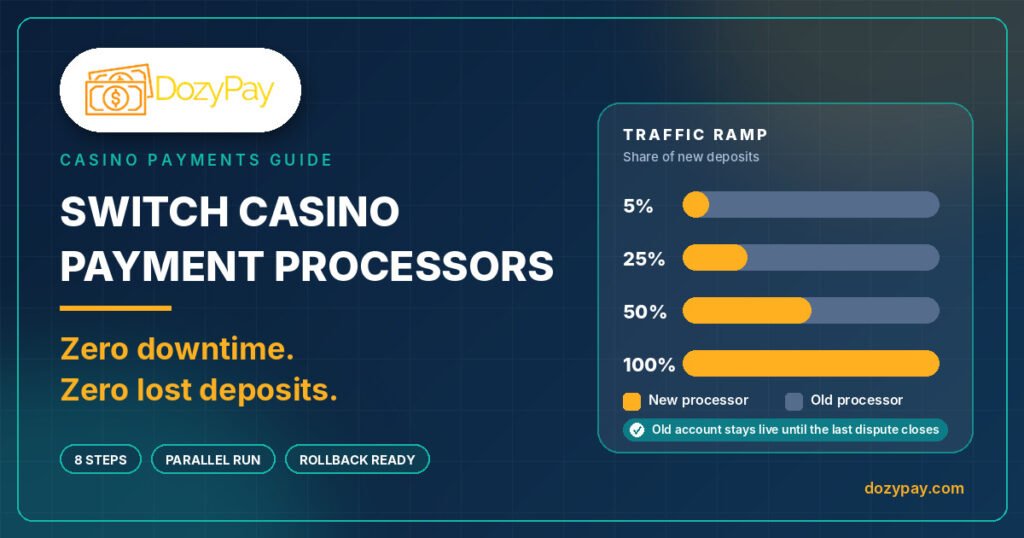
Then ramp traffic in small steps. One 2026 guide suggests starting with 1% to 5% of traffic. It then moves from 5% to 10% to 25% to 50% over days or weeks. The table below shows a sample plan.
| Stage | Share of new deposits | Suggested hold | Move on when |
| 1 | 1% to 5% | 2 to 3 days | Webhooks fire cleanly and approval rate matches your baseline |
| 2 | 10% | 2 to 3 days | Deposit-to-credit time matches the old processor |
| 3 | 25% | 3 to 5 days | The settlement report matches your ledger |
| 4 | 50% | 5 to 7 days | No duplicate credits; chargeback ratio holds steady |
| 5 | 100% of new deposits | Old account stays on standby | No rollback trigger has fired |
Treat the hold times as starting points. Adjust them to your volume. A busy operator sees enough data in a day. A smaller one may need a week.
Step 6: Protect Deposits That Are in Flight
When you switch casino payment processors, lost deposits usually happen in the gap between payment and credit. The player pays. The processor approves. Your platform never hears about it. The player sees no balance and opens a support ticket.
First, prevent this with four controls.
- Idempotency keys: Give each deposit a unique ID so retries never create duplicate credits.
- Signed webhooks: Verify every event and process repeats safely.
- Status checks: Treat the processor as the source of truth, not the player’s return to your site. Cashfree’s migration guide gives the same advice.
- Orphan checks: Run a job that finds approved payments with no matching credit.
Pick your cutover time with care. Avoid big fixtures, promotions and payout peaks. Also, keep the old processor’s webhook endpoints active for at least a week after the switch. Late events from older deposits will still arrive.
Finally, brief your support and finance teams. Tell them what to expect and who to call. Share a one-page guide with decline codes and escalation steps.
Step 7: Set Go/No-Go Metrics and Rollback Triggers
Before you switch casino payment processors at full volume, agree your rollback rules. Written triggers remove guesswork at 2 a.m. The table below lists the metrics most casino teams track.
| Metric | What to watch? | Pause the ramp if |
| Approval rate | By card brand, BIN range and country | It drops below your agreed floor |
| Deposit-to-credit time | Median and slowest 5% of deposits | Times rise sharply or credits stall |
| Webhook delivery | Failures, retries and delays | Failures repeat after a fix |
| Duplicate credits | Count per day | Any duplicate appears |
| Chargeback ratio | Dispute rate against card-network limits | The trend moves toward your limit |
| Settlement match | Payout amounts against your ledger | Gaps stay unexplained |
If any trigger fires, pause the ramp. Route new deposits back to the old processor. Then investigate the cause. Because both processors stay live, rollback is fast.
Step 8: Reconcile, Settle and Keep the Old Account Alive
Settlement schedules differ between processors. Next-day and three-day payouts change your cash flow. Your finance team must also reconcile two providers during the overlap. So, set up reports that tag each transaction by processor.
Refunds and chargebacks follow the original processor. A deposit made last month still belongs to the old account. Disputes can arrive weeks or months after cutover. Visa’s general filing limit is 120 days, although the start date depends on the dispute type.
So, keep the old account open until three things are true. No live deposits depend on it. The dispute window has closed. The reserve has been released. Then close it in writing, so your exit is clean.
A Sample 8-Week Timeline to Switch Casino Payment Processors
Every operator is different. Still, a simple timeline keeps the project on track.
| When | Milestone |
| Week 1 | Audit payment flows, record baselines and read the old contract |
| Weeks 1 to 2 | Apply to the new processor and gather licence and bank documents |
| Weeks 2 to 3 | Receive approval, open sandbox access and build the routing layer |
| Week 4 | Run sandbox tests and finalise the stored-card transfer plan |
| Week 5 | Go live at 1% to 5%, then 10% |
| Week 6 | Move to 25% and 50%, then reconcile the first settlement |
| Week 7 | Send 100% of new deposits to the new processor; keep the old account on standby |
| Week 8 and beyond | Handle the dispute tail, collect the reserve and close the old account in writing |
Fast approvals can shorten the first weeks. However, do not rush the ramp or the dispute tail.
Switching Social Gaming Merchant Account Providers: What Changes?
Social casinos and sweepstakes apps face extra steps when they switch casino payment processors. Social gaming merchant account providers underwrite virtual currency, coin packs and prize mechanics differently from real-money casinos. Confirm that your new provider accepts your exact model before you move any traffic.
Three things matter most. First, coin-pack checkout must stay fast on mobile. Second, age and identity checks must run before purchase. Third, geo-blocking must match the states and countries you serve.
Repeat buyers need special care. Players who buy coins every week often rely on saved cards. Plan their token move early. Otherwise, show a short, friendly prompt asking them to re-enter a card.
Compliance Note for Operators
DozyPay supports operators that hold valid licences in the markets they serve. Rules differ by country. Some markets prohibit real-money online gaming payments entirely. India is one example under its Promotion and Regulation of Online Gaming Act 2025. Check your licence conditions before you switch casino payment processors. Some regimes expect notice when a key payment supplier changes.
Common Mistakes When You Switch Casino Payment Processors
Most failed migrations share the same causes. Watch for these six.
- Cancelling the old account before the new one is live
- Moving 100% of traffic on day one
- Skipping webhook, refund and dispute tests
- Forgetting the reserve release date
- Ignoring stored cards until the last week
- Applying under the wrong MCC to speed up approval
Frequently Asked Questions
How long does it take to switch casino payment processors?
Plan for four to eight weeks for a careful, phased switch. Approval can take days or weeks. One 2026 guide says phased migrations run from a few weeks to several months, depending on complexity.
Can you switch casino payment processors with zero downtime?
Yes, in most cases. Run both processors in parallel, shift traffic in stages and keep a rollback switch ready. Zero downtime depends on routing, testing and monitoring.
Will players lose their saved cards when I switch?
Not always. It depends on whether your old processor supports a secure card-data transfer to a PCI-compliant receiver. If it does not, ask players to re-enter a card at their next deposit.
What happens to my rolling reserve when I switch?
The old processor usually keeps the reserve for a set period after processing stops. This is commonly 90 to 180 days. Ask for the release date in writing before you start.
Should I close my old merchant account right away?
No. Keep it open for refunds, chargebacks and reporting until disputes and the reserve are settled. Then close it in writing.
Is switching different for social gaming merchants?
Yes. Providers underwrite virtual currency and prize mechanics differently. Confirm the new provider accepts your model, and plan the token transfer early for repeat buyers.
Final Thoughts: Switch Without Losing a Single Deposit
So, a processor switch does not have to cost you deposits. The recipe is simple. Audit first, apply early and run both processors in parallel. Then ramp slowly and keep the old account alive until every loose end closes.
Want a second pair of eyes on your plan? Talk to the DozyPay team about a casino merchant account or a gambling payment gateway built for high-risk operators. You can also request a quote to start your approval while your old processor keeps running.